FundChamps Text Message Alerts
How team members opt in to fundraiser text alerts from FundChamps, what we send, and how to stop.
What we send
FundChamps sends automated updates to team members (the people running or selling in a FundChamps fundraiser) who choose to turn on text alerts. The texts are about their own fundraiser:
- A one-time code to confirm their phone number
- A confirmation when they sign up for text alerts
- When their fundraiser goes live and when it ends
- A daily progress reminder while the fundraiser is running
- A notice if the fundraiser is rescheduled
We never send marketing texts, and we never text supporters or customers who buy from a fundraiser.
Message frequency varies. Usually up to about 7 texts a week while a fundraiser is running, plus the one-time code and confirmation when you sign up.
Message and data rates may apply.
Texts come from (833) 569-6762.
How to opt in
Text alerts are off until a team member turns them on. Signing up takes two things: confirming the phone number, and checking a separate consent box that starts unchecked.
- Sign in to the FundChamps app for iPhone or Android.
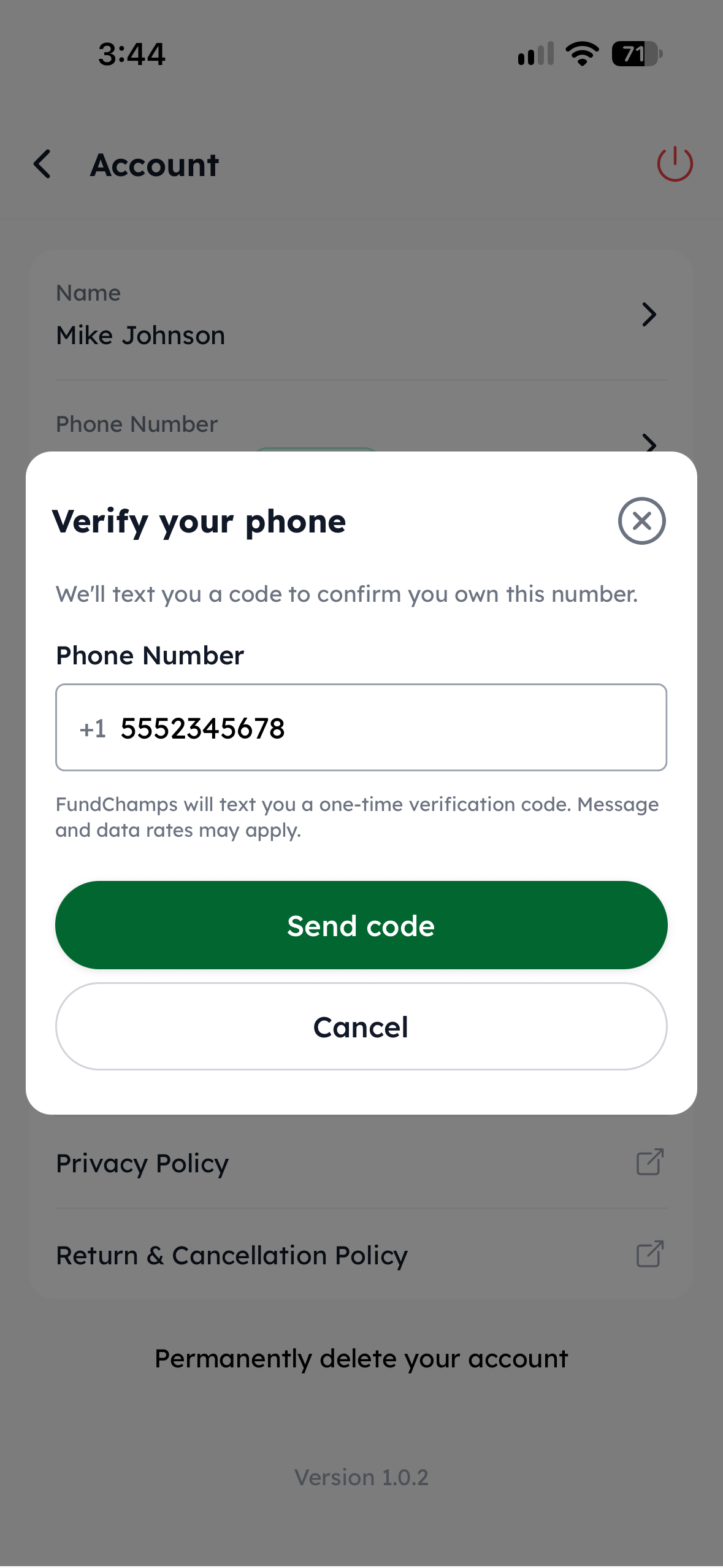
- Start from any of the places a phone number is added or changed. Each one opens the same two-step screen shown below:
- Account → Phone Number (add, change or verify the number)
- Account → Notifications, turning on SMS
- The Add Phone Number item on the fundraiser's or the team member's setup checklist
- Enter a 10-digit US mobile number and tap Send code. FundChamps texts a one-time code to that number.
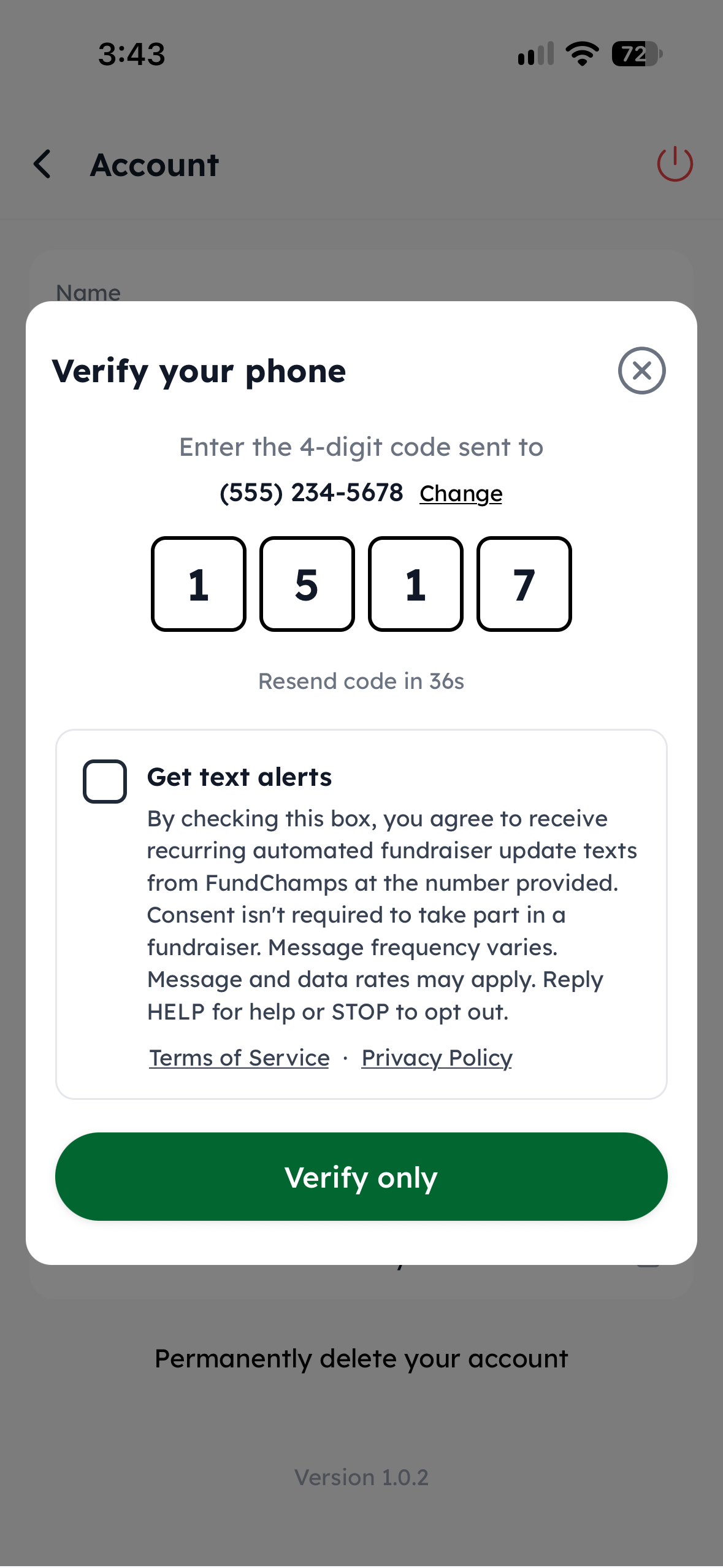
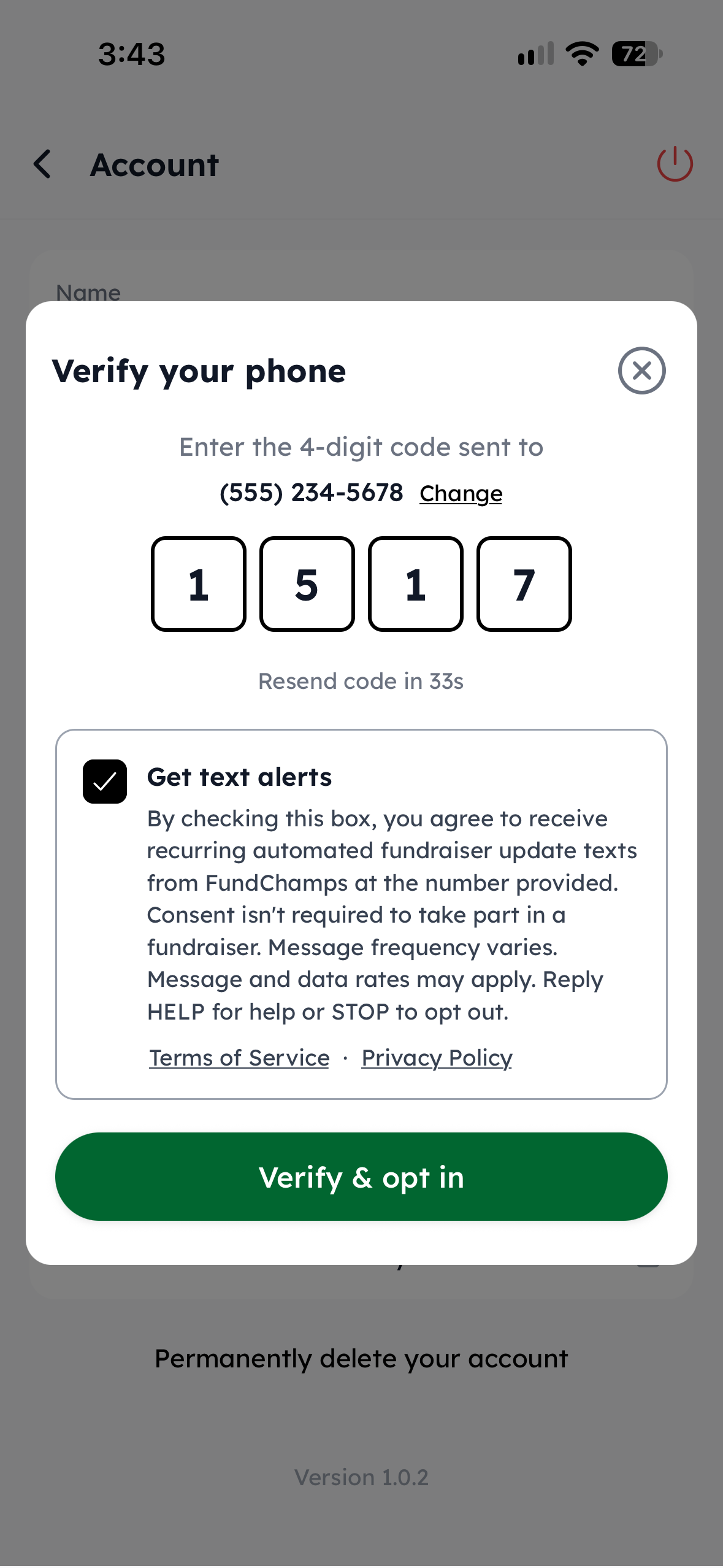
- Enter the code. Below it is the consent box, which starts unchecked. To get text alerts, check the box. The button then reads Verify & opt in.
- Submit. FundChamps records the time and IP address of the consent and sends the sign-up confirmation text.
Consent is optional. Leaving the box unchecked only confirms the phone number (the button reads Verify only) and no alerts are sent. Confirming the number completes the checklist item; nothing in FundChamps requires turning on texts.
Consent belongs to one number. If a team member changes their phone number, the new number is confirmed with a new code and text alerts stay off for it unless they check the box again.
Consent wording
The consent box shows this exact text, followed by links to our Terms of Service and Privacy Policy:
Get text alertsBy checking this box, you agree to receive recurring automated fundraiser update texts from FundChamps at the number provided. Consent isn't required to take part in a fundraiser. Message frequency varies. Message and data rates may apply. Reply HELP for help or STOP to opt out. Terms of Service · Privacy Policy
Screenshots of the opt-in screens
Examples of texts we send
- FundChamps: Your verification code is 1234.
- FundChamps: You're signed up for fundraiser text alerts. Message frequency varies. Msg & data rates may apply. Reply HELP for help, STOP to cancel.
- FundChamps: Your fundraiser is live! Open the app to manage your team. Reply STOP to opt out.
- FundChamps: Your fundraiser is live! Open the app to share your store and start selling. Reply STOP to opt out.
- FundChamps Day 3: Keep the momentum going — open the app to share, sell, or rally your team. Reply STOP to opt out.
- FundChamps: Your fundraiser was rescheduled to Oct 20. Open the app to see details. Reply STOP to opt out.
- FundChamps: Your fundraiser ended! Total raised: $1,245.00. Open the app for final results. Reply STOP to opt out.
How to stop or get help
- Reply STOP to any text to stop all alerts right away. UNSUBSCRIBE, END, QUIT, HALT, CANCEL, STOPALL, OPTOUT and REVOKE also work. You'll get one text confirming you're unsubscribed.
- Reply START (or UNSTOP, YES, OPTIN) to sign back up.
- Reply HELP (or INFO, SUPPORT) for help. The reply reads: FundChamps Support: Email help@fundchamps.com. Msg frequency varies. Msg & data rates may apply. Reply STOP to cancel.
- Or turn off SMS under Account → Notifications.
Stopping texts doesn't affect anything else: you can keep using FundChamps and still get email updates.
Wireless carriers are not liable for delayed or undelivered messages.
Privacy and Terms
Our Privacy Policy explains how we collect, use and protect personal information, including phone numbers. Our Terms of Service include the full text-alert program terms.
Text messaging opt-in data and consent are never shared with, sold to or rented to any third party.
Questions?
Email us at help@fundchamps.com.